
Download InfraRecorder Portable – CD/DVD Recording Software, Portable Utility, Media Creation Tool
Overview
InfraRecorder Portable is a lightweight and accessible CD/DVD recording utility designed for users who need reliable media creation capabilities without the overhead of complex software. Its primary purpose is to enable the burning of data, audio, and video discs across a variety of formats, making it a practical solution for individuals managing digital archives, backup tasks, or multimedia distribution. The app is especially suited for users who require a no-installation tool that can be used on multiple computers, such as students, educators, or professionals working in shared or public environments.
By operating as a portable application, InfraRecorder Portable eliminates the need for permanent installation, offering immediate access via USB drives or external storage. This makes it ideal for users who frequently switch between devices or lack administrative privileges on certain systems. The software addresses common pain points associated with disc burning, including compatibility issues, high system resource demands, and complicated workflows. It streamlines the process into a simple, intuitive experience suitable for both novice users and those with more technical experience.
Although the developer did not provide additional background information, the app’s long-standing presence in the software ecosystem suggests a level of stability and community trust. Its continued relevance highlights the ongoing demand for lightweight, reliable disc-burning tools in an era increasingly dominated by cloud storage and digital downloads. For users who still rely on physical media for data preservation or distribution, InfraRecorder Portable remains a valuable utility in the digital toolkit.
Key Features & Functionality
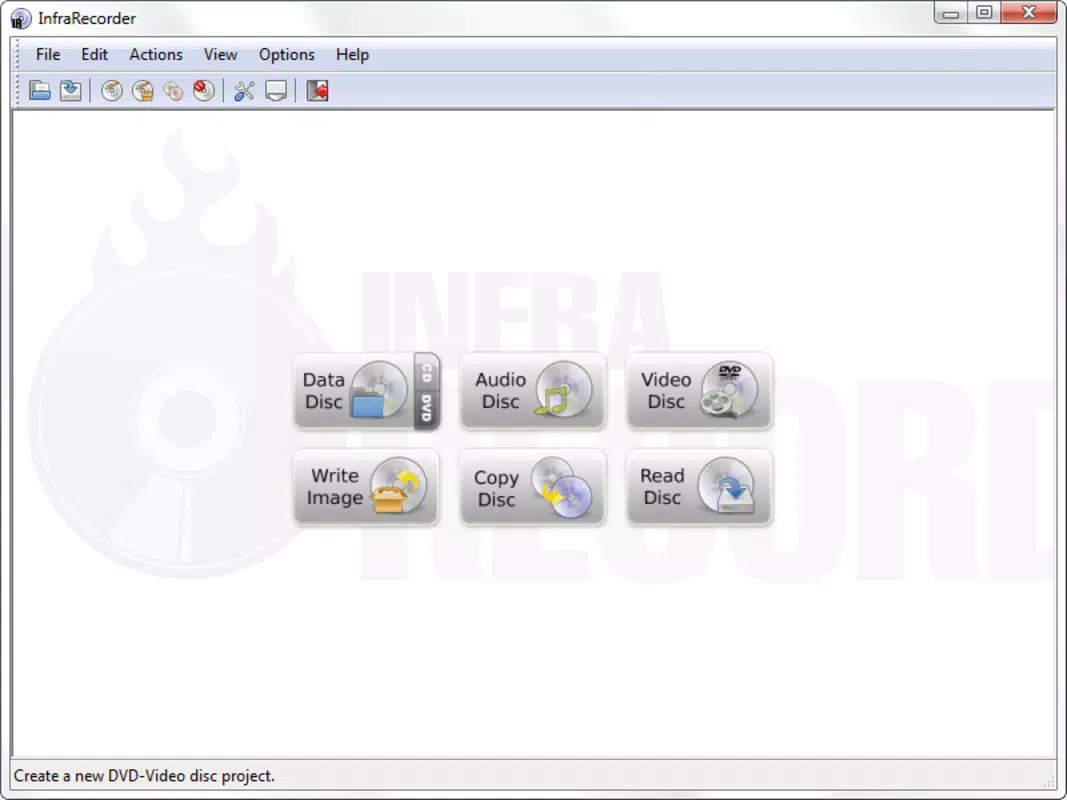
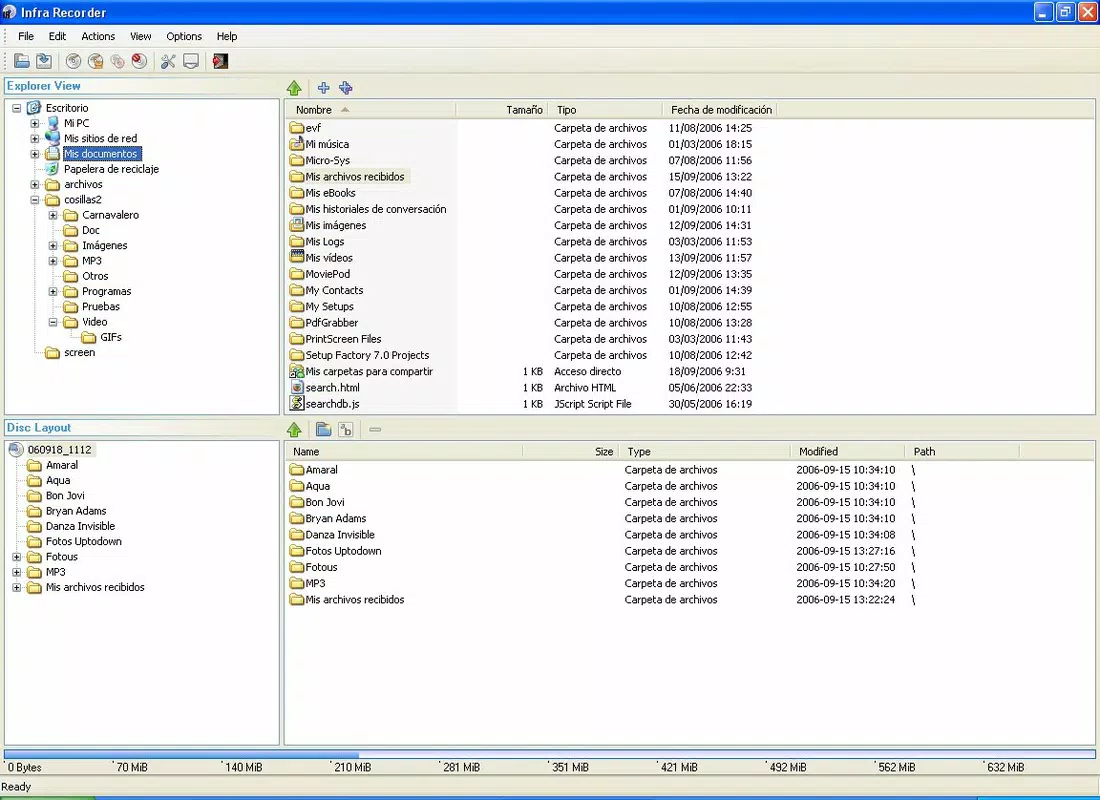
- User-Friendly Interface: The application features a clean, straightforward layout that simplifies navigation for all skill levels. Users can initiate disc burning tasks with minimal setup, reducing the learning curve typically associated with disc-authoring software.
- Portable Operation: Designed to run directly from a USB drive or external storage, InfraRecorder Portable requires no installation. This allows users to carry their preferred burning tool across different machines, ensuring consistent performance regardless of the host system.
- Low Resource Consumption: The software is optimized to use minimal system resources, enabling smooth operation even on older or low-spec computers. This efficiency ensures that background processes are not disrupted during disc creation.
- Multi-Format Support: InfraRecorder Portable supports a wide range of disc formats, including CD-R, CD-RW, DVD-R, DVD+R, DVD-RW, and DVD+RW. This versatility allows users to create data discs, audio CDs, and video DVDs with confidence.
- Reliable Burning Engine: The underlying burning engine is designed to produce accurate and error-free discs, reducing the risk of data corruption or playback failure. This reliability is crucial for users creating long-term backups or distributing content.
For example, a teacher preparing a multimedia presentation for multiple classrooms can use the app on any school computer without installation. Similarly, a freelance photographer might use it to burn client portfolios onto DVDs using different computers at various locations. These real-world applications underscore the app’s practical value in diverse environments.
Interface, UX & Performance
The user interface of InfraRecorder Portable is minimalistic and logically structured, prioritizing functionality over visual flair. Navigation is achieved through clearly labeled tabs and menus, allowing users to select disc type, add files, and initiate the burning process with few clicks. The layout remains consistent across different screen sizes, contributing to a stable and predictable user experience.
Although the developer did not list formal performance metrics, the app’s lightweight design suggests it operates efficiently across a range of device categories, from older desktops to modern laptops. Responsiveness is maintained during file selection and burning tasks, with minimal lag even when handling large data sets. Stability is a key strength, as the software maintains consistent behavior during prolonged use and across multiple sessions.
Users can expect smooth operation without frequent crashes or unexpected errors, a critical factor when working with time-sensitive data. The absence of background processes or unnecessary startup routines further enhances its performance profile. While specific device compatibility details were not disclosed, the app’s portability implies broad compatibility with standard Windows systems equipped with CD/DVD drives.
Platform Compatibility & Technical Requirements
InfraRecorder Portable is designed to run on Windows operating systems. The specific version and minimum OS requirements were not listed by the developer. The application’s file size is 4.8 MB, indicating a compact footprint suitable for portable storage.
Although the developer did not specify minimum OS requirements, the app’s lightweight nature suggests it may function on older Windows versions such as Windows 7 or later. However, users are advised to verify compatibility with their system configuration before use. The absence of installation steps means the software can be launched directly from a USB drive or folder, making it accessible on any Windows machine with a disc drive.
Pros and Cons
Pros
- Runs without installation, ideal for shared or restricted environments
- Extremely small file size, easy to store and transfer
- Low system resource usage ensures smooth performance on older hardware
- Supports multiple disc formats for versatile media creation
- Reliable burning engine with consistent output quality
Cons
- Platform is limited to Windows; no support for macOS or Linux
- Developer did not provide detailed system requirements
- No built-in update mechanism; users must manually check for new versions
- Interface lacks modern design elements, appearing dated
- Only available as a portable version; no traditional installer option
FAQ
Is InfraRecorder Portable safe to use?
Yes, the application is considered safe when downloaded from trusted sources. As a portable tool, it does not install drivers or modify system settings, reducing the risk of unintended changes.
Can I use InfraRecorder Portable on any computer?
Yes, as long as the computer runs a compatible Windows operating system and has a CD/DVD drive. The portable nature allows it to be used on any machine without installation.
Does InfraRecorder Portable require an internet connection?
No, the software operates offline. Internet access is only needed if users choose to manually check for updates.
How do I update InfraRecorder Portable?
Updates are not automated. Users must visit the official website or trusted repository to download the latest version manually.
Is InfraRecorder Portable free to download and use?
Yes, the application is available at no cost. There are no in-app purchases or subscription fees.
Final Thoughts
InfraRecorder Portable stands out as a dependable, no-frills solution for users who need to burn CDs and DVDs without the complexity of full-featured software. Its portability, low resource usage, and multi-format support make it a practical tool for students, educators, and professionals who work across multiple systems. While the interface may appear outdated and the platform is limited to Windows, the app delivers consistent performance and reliability.
For those who still rely on physical media for data backup, content distribution, or archival purposes, InfraRecorder Portable offers a lightweight, secure, and efficient alternative. Its ability to run from a USB drive without installation makes it uniquely suited for temporary or restricted environments.
Download InfraRecorder Portable now


